Product
Change the menu in one place
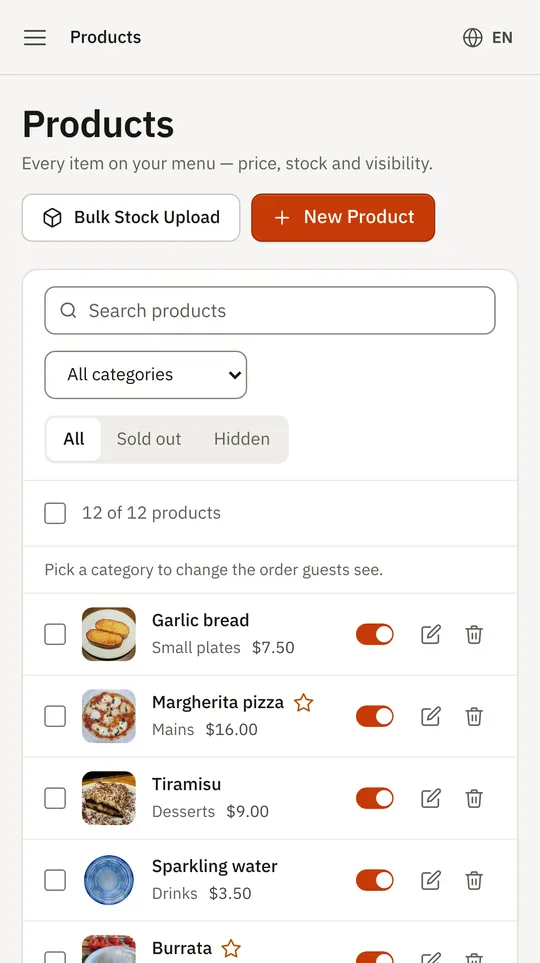
Menu management is everything you do to keep the menu true: prices, availability, categories, options and allergen information. In Thmenu you change it once in the panel and every place the menu appears — QR codes, your website, the kiosk — shows the new version, with nothing to reprint.
A café that changes its specials every day and a restaurant that updates its prices make the change in the same place.
Everyday changes
Price change
Edit one price, or change many at once by a percentage.
Sold out
Mark an item sold out by hand, or let stock tracking do it when the count reaches zero.
Time of day
Show a category only on certain days and between certain hours — breakfast in the morning, a lunch menu at noon.
What you can manage
- 01
Options and add-ons
Sizes, extras and choices with their own prices, attached to the items they belong to.
- 02
Allergens
Tag each item with the 14 EU allergens; guests see them on the item page in their language.
- 03
Several menus
Keep more than one menu and choose which one is live.
- 04
Import what you already have
Start from a photo of the menu, a PDF or Word file, a spreadsheet or a web page; the import is shown for review before anything is published.
- 05
Bulk edits
Select many products and change them together, or export the menu.
- 06
Description drafts
Ask for a first draft of an item description, then edit it in your own words before saving.
Good to know
- Review what AI produces
- Reading a menu from a photo and drafting descriptions are done by an AI model, which can also suggest allergens and ingredients the menu did not print. Check names, prices, allergens and wording before you publish.
Questions and answers
- Can I change many prices at once?
- Yes. Select the items and raise or lower their prices together by a percentage, or edit one price at a time.
- Can I show breakfast only in the morning?
- Yes. A category can be shown only on chosen days and between chosen hours.
- Do I have to type the menu in from scratch?
- No. Import it from a photo, a PDF or Word file, a spreadsheet or a web page, and review the import before anything is published.
Menu management