
Thmenu
Your restaurant panel in your pocket: menu, orders and reservations. Free, like everything in Thmenu.
Free forever — every feature included
Replace paper menus with QR codes, real-time ordering, 31 languages, and AI-powered content — all in one platform. Setup takes 2 minutes.
Free forever · No credit card · Ready in 2 minutes
Works with
Video
A short walkthrough of Thmenu, shown on a sample restaurant.
Pricing
No subscription, no plans and nothing locked behind an upgrade. Thmenu earns only when a guest pays you online through Thmenu.
When a guest pays you online through Thmenu, the Thmenu platform fee is 1% of that payment.
The payment processor’s own fee, for example Stripe’s, is separate and is taken by the processor.
Cash, your own card terminal and any payment that does not go through Thmenu: 0%.
Online payment through Thmenu depends on your country and an active payment provider. Where it is not available, ordering still works and guests pay you directly. Where online payment works →
Features
From QR code generation to real-time order tracking, AI-powered content to multi-language menus — Thmenu is the complete digital solution for your growing business.
Every table gets its own QR code that opens your menu in the browser — guests need no app and no account.
The menu opens in the language of the guest's phone when it is one of 31 supported languages. Dish names and descriptions are translated automatically in the background, and you can correct any translation.
Guests order from their table and the order appears in your dashboard live, with a sound alert and a push notification for your staff.
See how often each dish was opened, added to the cart and ordered, your orders and revenue day by day, and a heatmap of your busiest hours.
Type a dish name and AI suggests a description, ingredients and allergens for you to check before saving. The whole menu can then be translated into every language you serve.
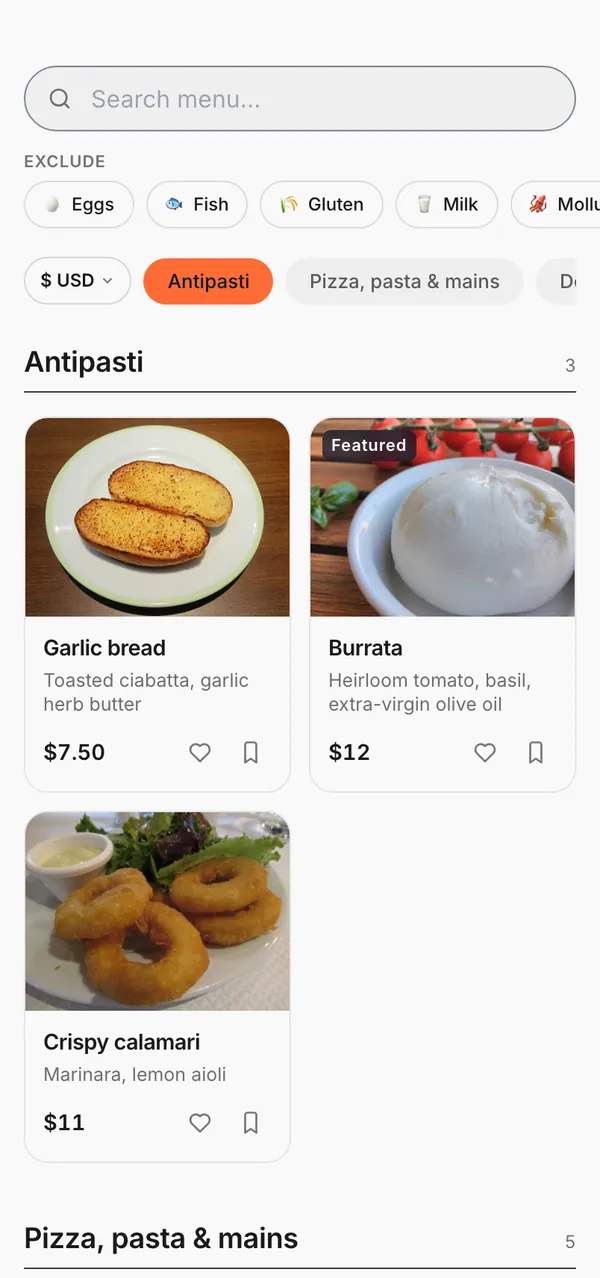
Pick your own colours or a preset, and show the menu as a grid, a list or a compact list with your choice of card style.
Orders are checked for Tor or VPN use, signs of a faked location and sudden bursts, and risky ones are flagged for your staff. Ordering is rate-limited, and a repeated submission does not create a second order.
Show promotion banners on your menu for a date range or a weekly time window such as happy hour, and offer discount codes with start and end dates.
Guests can add your menu to their home screen on iOS and Android. A menu opened on the phone in the last day stays readable without a connection, and orders placed offline are sent when it returns.
Served from Cloudflare's global edge network, so your menu loads from a node near your guest. Actual speed depends on their connection.
When the bill is closed at a table, guests can rate their visit, and every rating appears in your dashboard.
Guests can call a waiter or ask for the bill from their table, and your staff see and close each call in the panel.
Role presets for waiters, cashiers, kitchen staff and managers, each with its own permissions. Staff sign in with a PIN on the kitchen display and the staff watch app, and key changes are logged.
Enter table, takeaway and phone orders from your dashboard; a printable receipt opens after each one.
Built-in font size controls and high-contrast mode on every menu. Customers with visual impairments can adjust the display to their needs — no extra setup required.
Change a price or a dish whenever you want and the menu updates; the printed QR codes stay the same, so there is nothing to reprint.
Guests pay by card from their own phone through Stripe, with Apple Pay and Google Pay on supported devices, in countries where Stripe is available.
Turn a tablet into a full-screen self-service menu at your counter: guests browse and place takeaway orders, and the screen resets between customers.
Members earn points on every order and move up tiers that earn faster, and you can see and adjust each member's balance from your dashboard.
Take bookings — guests who leave an email address get a confirmation and updates by email — and keep a walk-in waitlist in your dashboard.
Your restaurant website
Your Thmenu link does more than open a menu — it serves the whole guest app at one address. Each part below appears when you switch it on.
THE GUEST PATH
No app to install, no hardware to buy. The guest scans the code and these six steps work on their own.
The menu opens in the language of the guest’s phone — 31 languages, with nobody asked to choose.
Prices show in the guest’s currency alongside the local one — no calculator needed.
The guest adds to the cart and sends the order — it lands straight on the kitchen display.
One button at the table alerts the team with the table number — no raised hand, no waiting to catch an eye.
The guest asks for the bill from their phone and the request reaches the team with the table and running total.
The guest pays by card from their phone in the provider’s secure form. Pay-first is the default: the order does not reach the kitchen before it is paid.
In the venue
Guests at the same table order from their own phones into one table session, and the bill can be split the way the table wants.
Each table has its own code, so the menu knows which table it is serving.
Every phone that scans the code joins the same table session.
Each guest picks their own dishes and sends the order. By default a member of staff accepts it before the kitchen starts.
Ask for the whole bill, only what your phone ordered, an equal share, a percentage or a set amount; staff are notified and settle it with the table.
Order another round in the same session; where the restaurant allows it, call a waiter or ask for the bill from the menu.
The complete platform
Everything across 7 categories — QR menus, table & room ordering, KDS, inventory, AI, payments, loyalty, reservations, and an installable mobile app.
The system
Each part has its own page: what it does, how it works step by step, and where its limits are.
How a Thmenu QR menu works: one code per table, a live menu that updates without reprinting, the guest's own language, and ordering when you want it.
A Thmenu digital menu is one web menu you manage in one place and serve through QR codes, a link, a kiosk tablet or an AI assistant.
A Thmenu menu opens in the guest's own language. Translate your menu in one step, follow each language's progress, and keep allergen names fixed per language.
How QR table ordering works with Thmenu: guests scan the table code, order from their phone, and the order reaches the kitchen display with its table number.
Take pickup and delivery orders from your own menu link: a flat delivery fee, a minimum order, time slots, and tickets on your printer.
Pay at table with Thmenu: guests ask for the bill from the menu and pick a split. Where the venue takes cards, they pay for their order by card.
One panel for the menu, table orders, the kitchen screen, staff, reservations, card payments, loyalty and reports, with every module open to every restaurant.
Every Thmenu restaurant gets a website on menu.thmenu.com: the live menu, an About page with hours, location, photos and contact, and bookings.
Manage your menu in one place with Thmenu: change prices, mark items sold out, schedule categories, add options and allergens, and import an existing menu.
Turn a photo, PDF, Word file or web page of your menu into a digital menu with Thmenu's AI importer. You review every dish before it is added.
Take table reservations and run a waitlist from your Thmenu menu: guests pick a time, you confirm, and the guest is emailed about each change.
Turn a tablet into a self-order kiosk with Thmenu: guests order from your live menu at the counter and pay there, or by card where you take card payments.
Run a restaurant loyalty program inside your Thmenu menu: guests earn points when they order and climb tiers; your staff redeem the rewards you define.
Thmenu analytics show how guests use your menu: scans by day and table, the items people open, orders and revenue over time, best sellers and busy hours.
Thmenu runs an MCP server so AI assistants can find restaurants, read menus, request reservations and prepare orders that the guest confirms.
Discover
Being listed in the Thmenu directory is your choice. A guest can follow a restaurant without an account, and their favourite orders stay on their own phone.
Scan the code on the table, open the restaurant's link, or find a listed restaurant in the Thmenu directory.
A guest can follow the restaurant without an account and see its announcements, campaigns and new dishes.
If the restaurant runs loyalty, points are added when the guest orders through the menu.
My Thmenu keeps followed restaurants and favourite orders on the guest's own device.
Open to AI assistants
Thmenu supports the Model Context Protocol (MCP), which assistants use to call tools. An assistant only sees restaurants that chose to be listed, and it never takes payment — the guest confirms.
The assistant searches restaurants that chose to be listed in the Thmenu directory.
It reads the live menu and the open reservation slots — the same data your guests see.
It can request a reservation, or build a cart and, with the guest's sign-in, place an order.
Payment is never taken by the assistant; the guest finishes on the restaurant's own confirmation page.
THE LAYER UNDERNEATH
Most QR menus look alike. What sets Thmenu apart is the infrastructure you don’t see.
Your menu is published so AI assistants like ChatGPT, Perplexity and Claude can read and recommend it (llms.txt, JSON-LD, MCP).
No tablet, POS terminal or printer required — a phone and a QR code are enough.
No subscription and no setup fee. When a guest pays you online through Thmenu, the platform fee is 1% of that payment, on top of the processor’s own rate; cash and your own terminal cost nothing.
Every guest sees the menu in their own currency — € for Germans, £ for Brits, ₺ for Turks.
Guests pick their language; your menu reads natively in 31 of them.
Smart risk scoring against fake and sabotage orders, verified against your venue’s Wi-Fi.
How It Works
No technical knowledge required. Step-by-step with an intuitive admin panel.
Add your categories and products. Upload photos, set prices. Generate descriptions automatically with AI.
Choose colors, fonts, and theme. Upload your logo. Get a unique look that reflects your restaurant's identity.
Download print-ready QR codes for every table in one click. Place them on tables — you're live.
Customers scan, browse, and order. You track all orders from a single panel, updating statuses as needed.
PER-ORDER COST
Delivery apps typically charge restaurants a commission on every order. Thmenu has no subscription: card payments you collect through Thmenu carry a 1% platform fee on top of the Stripe rate, and nothing else is charged.
The 1% Thmenu platform fee applies to card payments collected through Thmenu and is charged on top of the Stripe processing rate.
Mobile app
Your restaurant panel in your pocket: menu, orders and reservations. Free, like everything in Thmenu.
Open in browser
Open thmenu.com in your mobile browser — no app store needed
Add to home screen
iOS Safari: 'Share → Add to Home Screen', Android Chrome: 'Menu → Install App'
Use like a native app
Works offline too. Updates instantly — no store review wait.
FAQ
Didn't find what you were looking for? Our team is happy to help.
Ask UsNo. Customers simply scan the QR code with their phone camera. The menu opens instantly in the browser — no app download, no account, no registration required.
Thmenu supports 31 languages including Arabic (RTL), Japanese, Chinese, Korean, and all major European languages. The visitor's device language is automatically detected.
Yes. There are no plans, no subscription and no feature locked behind an upgrade. Thmenu’s only revenue is a 1% platform fee on payments guests make to you online through Thmenu; cash and your own card terminal cost nothing.
Not yet. In the panel you can add your domain and check its DNS, but the menu cannot be served from your own domain yet. Your menu has its own link on menu.thmenu.com, and that is what your QR codes open.
Customers add items to their cart and place an order from the table. The order appears instantly in your admin dashboard where you update status steps.
Thmenu is built on Cloudflare's global security infrastructure and encrypts data in transit (TLS) and at rest. Our platform is designed to meet GDPR, KVKK, and CCPA/CPRA requirements — see our compliance, privacy, and terms pages for the full disclosure.
Yes. The AI menu importer takes your menu three ways: paste the text, photograph the printed menu, or upload a spreadsheet. It proposes categories, products and prices, and nothing is applied until you review the proposal and approve it.
Yes. Thmenu uses Progressive Web App (PWA) technology. The cached menu on the customer's device can be viewed without an internet connection. Ordering requires a connection.
Only if you want guests to pay you online through Thmenu. You connect a Stripe account from the panel and payouts go to your bank through Stripe. The menu, ordering and reservations work without it.
Yes. Thmenu runs on Cloudflare's global edge network, so your menu is served from a node near each guest. We support 31 languages including Arabic, Japanese, Korean, Chinese, and all major European languages.
Thmenu can run alongside your existing POS: the POS handles payments, and Thmenu handles the QR menu and the customer ordering experience. Thmenu doesn't connect to the POS — the two systems run side by side.
No. Thmenu runs in any browser — phones, tablets or laptops. For a kitchen display any tablet you already own works; we do not sell, recommend or require specific hardware. Printing is optional and works with ESC/POS receipt printers connected over USB, serial or Bluetooth from Chrome or Edge.
Ready to get started?
2-minute setup, no credit card required.