Product
Pay at the table: ask for the bill, split the way the table wants
Pay-at-table lets guests start settling up from their own phone instead of waving for the bill. With Thmenu a guest asks for the bill from the menu and picks how it should be split — the whole bill, only what this phone ordered, equal shares, a percentage or a set amount — and staff are notified and settle it the usual way. Where the restaurant takes card payments through Stripe, a guest can also pay for their order by card as they place it, on a secure checkout page hosted by Stripe.
Cafés and restaurants use the same flow: guests at any table with a code can ask for the bill from their own phone.
How it works
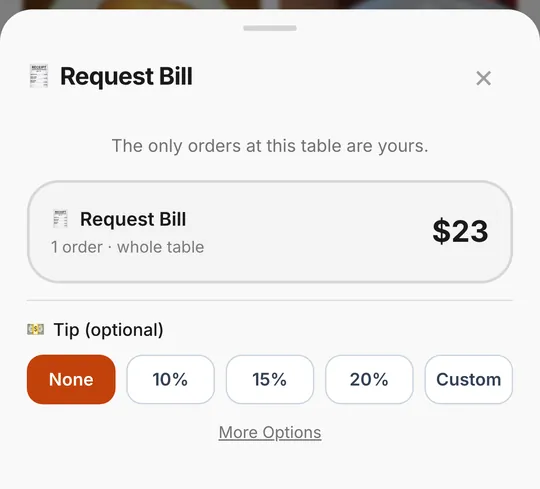
Ask for the bill
From the menu, the guest asks for the bill of their table session and can add a tip.
Choose a split
The whole bill, only the orders placed from this phone, an equal share, a percentage or a custom amount.
Staff settle it
Staff are notified with the table, the amount and the chosen split, and close the bill the usual way.
Or pay the order by card
Where the restaurant takes card payments, a guest can pay for their order by card when placing it, on Stripe's hosted checkout page. Card authentication (3-D Secure) is handled there, and the paid order is marked as paid for staff.
What it handles
- 01
Splitting without arithmetic
The guest picks the split on the phone and the menu works out the amount, so nobody has to divide the total at the table.
- 02
Tips
Guests can add a tip when they ask for the bill. When paying an order by card, they can adjust the tip within a maximum the restaurant sets.
- 03
Paid into the restaurant's own account
The payment is a charge on the restaurant's own connected Stripe account.
- 04
Bill request without online payment
Where online payment is not available, guests can still request the bill from the menu and pay the usual way.
Good to know
- Where it works
- Card payment needs the restaurant to connect a Stripe account in a country Stripe supports for this kind of payment and to switch on card payments in Settings. Elsewhere, ordering and bill requests still work and payment happens at the venue.
- Splitting is by share, not by dish
- A guest can ask for the bill of only what their own phone ordered, but cannot pick individual dishes from a shared order. Staff see the chosen split and settle it with the table.
- Card wallets
- Which wallet buttons appear on the checkout page is decided by Stripe for the guest's device and the restaurant's account.
Questions and answers
- How can guests split the bill?
- When they ask for the bill from the menu: the whole bill, only what their own phone ordered, an equal share, a percentage or a set amount. Staff see the choice and settle the bill the usual way; picking single dishes from a shared order is not available.
- Where does the money go?
- Card payments made in the menu go into the restaurant's own connected Stripe account. The Thmenu fee is 1% of the payment, and the payment processor's fee is separate.
- What if online payment is not available in my country?
- Guests still order and ask for the bill from the menu, and pay at the venue the usual way. Online payment needs a Stripe account in a country Stripe supports.
Pay at table