Product
One panel for the whole restaurant
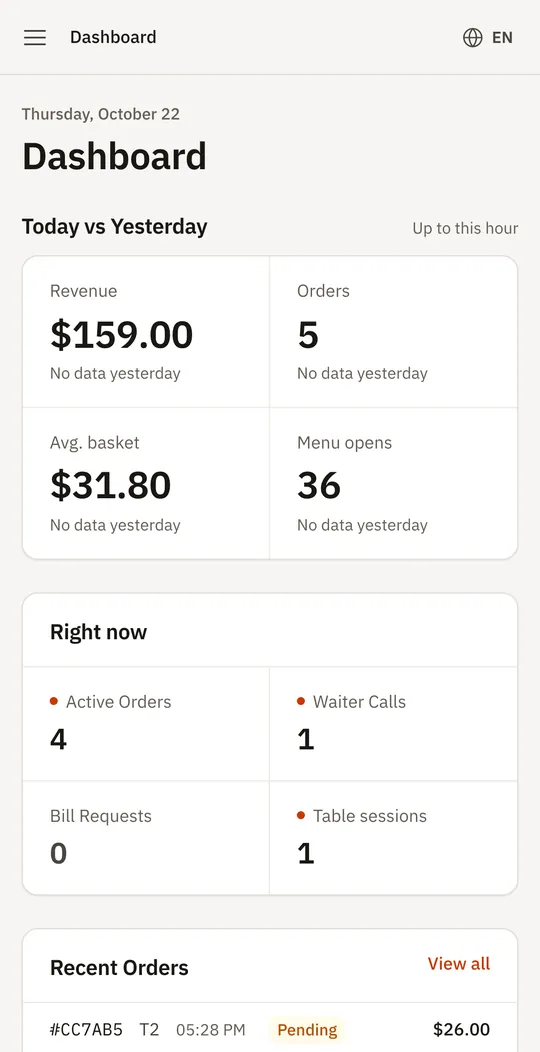
A restaurant management platform puts the menu, orders, staff and guests in one system. Thmenu's panel covers the menu, table ordering and the kitchen screen, staff and their permissions, reservations, card payments into your own Stripe account, loyalty and reports. Every module is open to every restaurant, and it runs in the browser.
Cafés and restaurants use the same panel: a café may need only the menu and orders, a restaurant also reservations, staff and the kitchen screen.
From the menu to the report
Set up the menu
Menus, categories, dishes, options and allergens; import an existing menu or type it in.
Take orders
Orders from table QR codes and pickup orders arrive as waiting, and staff accept them on the kitchen screen.
Run the floor
Staff sign in with a PIN and see waiter calls and bill requests live; tickets and receipts print on ESC/POS printers.
Get paid
Guests pay by card into your own Stripe account, at the table or online, or the usual way at the counter.
Look back
Sales and best sellers, an end-of-day Z report and a tax report by month.
Also in the panel
- 01
Reservations and a waitlist
Guests request a table from your menu; you confirm it, and a guest who left an email address is told by email.
- 02
Stock and recipes
Stock counts mark a dish sold out when they reach zero, and recipes give the food cost of each dish.
- 03
Guests and loyalty
Guest profiles from loyalty sign-ups and reservations, points and rewards, campaigns, promo codes and email newsletters.
- 04
Holiday mode
Pause ordering, the kiosk, waiter calls and bill requests; the menu stays visible with a banner.
What is included, and what is not
Every module below is open to every restaurant. The ones marked not included are things Thmenu does not do, so you know what to keep using alongside it.
| Area | In Thmenu | Details |
|---|---|---|
| Menu, options and allergens | Included | Type the menu in or import an existing one; the same menu feeds the QR codes, the kiosk and the website. |
| Table orders and the kitchen screen | Included | Orders arrive as waiting and staff accept them on the kitchen screen. |
| Staff, PINs and permissions | Included | Staff sign in with a PIN and see only what their permissions allow. |
| Staff hours | Included | A time clock records when staff clock in and out. |
| Card payments | Included | Into your own Stripe account, in countries Stripe supports. |
| Reservations, waitlist and loyalty | Included | Guests book, queue and collect points from your menu. |
| Reports | Included | Sales and best sellers, an end-of-day Z report and a tax report by month. |
| Several locations | Included | One owner can run several venues and switch between them in the panel. |
| Payroll | Not included | Thmenu does not calculate wages, pay staff or handle payroll taxes. |
| Accounting | Not included | The finance page keeps a simple record of income, expenses and supplier payments; it is not accounting software and files no tax returns. |
| Other point-of-sale systems | Not included | Thmenu does not connect to other point-of-sale systems. |
| Text messages | Not included | Thmenu sends no SMS to guests or staff. |
Good to know
- No POS integrations
- Thmenu does not connect to other point-of-sale systems.
- Card payments need Stripe
- Taking cards in the app needs a Stripe account in a country Stripe supports; cash and your own card terminal stay outside Thmenu.
Questions and answers
- Do some modules cost extra?
- No. Every module is open to every restaurant. Thmenu earns 1% of payments processed through Thmenu; cash and your own card terminal carry no Thmenu fee.
- What does Thmenu not do?
- Thmenu does not run payroll, keep your accounts, connect to other point-of-sale systems or send text messages.
- Do I need special hardware?
- No. The panel runs in the browser. Printing tickets and receipts is optional and uses ESC/POS printers.
Management platform